Recording Mileage Donations
Summary: Track miles driven for charitable service, plus optional parking or tolls. Charity Record uses the IRS charitable mileage rate for the year when calculating value. See IRS Publication 526 for eligibility and recordkeeping rules.
Add a mileage donation
- Select the charity in the Charity name dropdown.
- Choose One-time trip or Recurring trip.
- Enter the Date of trip for one-time trips.
- Enter Miles driven.
- Add optional Other transportation costs and a description.
- Fill in the Purpose of trip.
- Click Add donation.
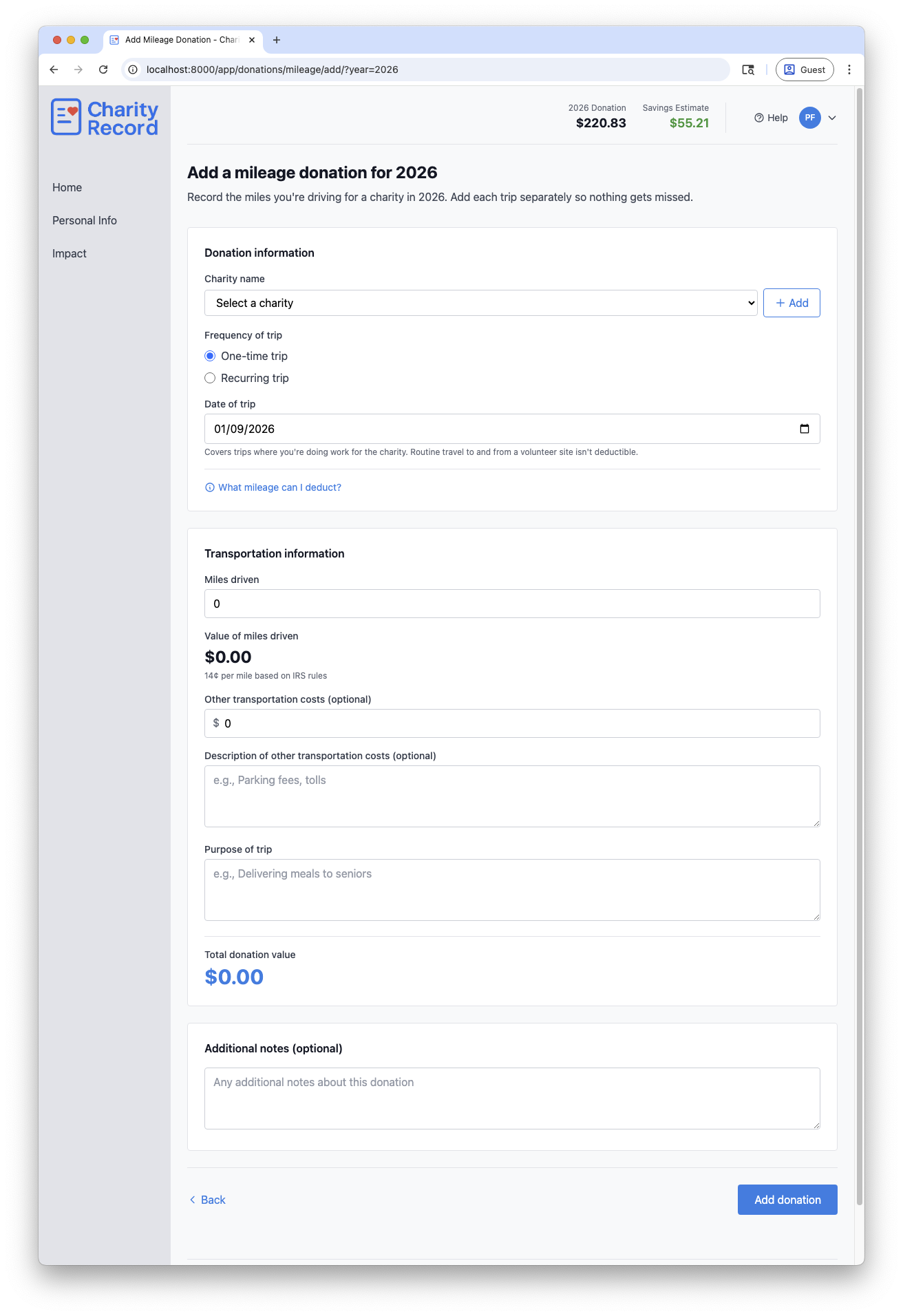
If the charity is new, select + Create new charity or click Add to open the full charity form.
What mileage generally counts
Based on IRS Publication 526, deductible mileage generally includes:
- Driving to perform volunteer services
- Transporting donated goods or supplies
- Driving other volunteers or clients at the charity's request
Mileage generally does not include:
- Personal errands or social events, even if the charity benefits incidentally
- Commuting to and from your regular volunteer site
- Travel with a significant personal or vacation purpose
- Any mileage the charity reimburses
Routine maintenance, depreciation, registration fees, insurance, and tire wear are not deductible under the standard mileage rate.
Use the What mileage can I deduct? link on the form to see examples.
How Charity Record calculates value
- Value of miles driven is miles multiplied by the IRS charitable mileage rate for that year.
- You can add Other transportation costs like parking fees and tolls.
- IRS guidance generally allows either the standard mileage rate or actual gas and oil costs. Charity Record uses the standard mileage rate.
If the IRS rate for a future year is not available yet, Charity Record uses the most recent available rate and shows a note in the form.
One-time vs recurring trips
One-time trip
- Use this for a single trip on a specific date.
Recurring trip
- Use this when you make similar trips multiple times in a year.
- Enter Trips per year and Charity Record calculates the total.
Records to keep
The IRS expects reliable written records. In practice, keep:
- Date of each trip
- Miles driven
- Charitable purpose
- Parking or toll receipts if you include them
Edit or delete a mileage donation
- Open the mileage donation list for the year and click Edit.
- To remove it, click Delete and confirm in the modal.
Charity Record is a donation tracking tool, not a tax advisor. This article summarizes publicly available IRS guidance to help you use our software. You are responsible for ensuring your tax filings comply with IRS requirements. For complex situations such as mixed personal and charitable travel or alternative cost methods, consult a tax professional for advice specific to your situation.