How to Continue Tracking Your Donations after ItsDeductible

Charity Record
charityrecord.com/Intuit's charitable donation tracking tool ItsDeductible shut down on October 21, 2025. Whether you have your ItsDeductible data or still need to retrieve it from Intuit, your goal is the same: get your history into a new tool and keep tracking.
This guide covers how to get your ItsDeductible data into Charity Record, what carries over when you import, and how to continue tracking donations going forward.
ℹ️ Haven't exported your data yet? Many people haven't. Start with our step-by-step export guide to retrieve your history from Intuit, then come back here to learn how to import it into Charity Record.
What happened to ItsDeductible?
ItsDeductible launched in the 2000s as a free donation tracking tool for TurboTax users. It helped people look up estimated fair market values for item donations and keep item, mileage, cash, and stock donation records for tax time.
In 2022, Intuit announced it would discontinue ItsDeductible. After significant pushback from users, they reversed the decision. Then in September 2025, they announced a shutdown again, and on October 21, 2025, ItsDeductible went offline for good. The web app and mobile app were both sunset.
We here at Charity Record were ItsDeductible users ourselves. When it shut down, we built what we wished existed: a modern donation tracker that works on any device with a browser, and we picked up where ItsDeductible left off.
Two ways to get your ItsDeductible data
If you haven't retrieved your ItsDeductible data yet, there are two paths to getting it, depending on when you last used ItsDeductible.
Intuit data request (most common). If you didn't export before the shutdown, you can still request your data from Intuit. You'll get a ZIP file containing an XLSX spreadsheet (ItsDeductibleOnline.xlsx) with your donation history across all years. The process can take up to 15 days, so start it as soon as you can.
See our export guide for the full walkthrough (with screenshots).
Legacy CSV exports. If you exported before the shutdown using ItsDeductible's original export CSV feature, you may have individual files for each donation type (Items, Cash, Mileage, Stock) plus an Overall summary. Charity Record accepts all of these file types.
See our import format guide for supported file types and columns.
Either way, the import process is the same: drop your file into the import screen and preview what we detected before confirming.
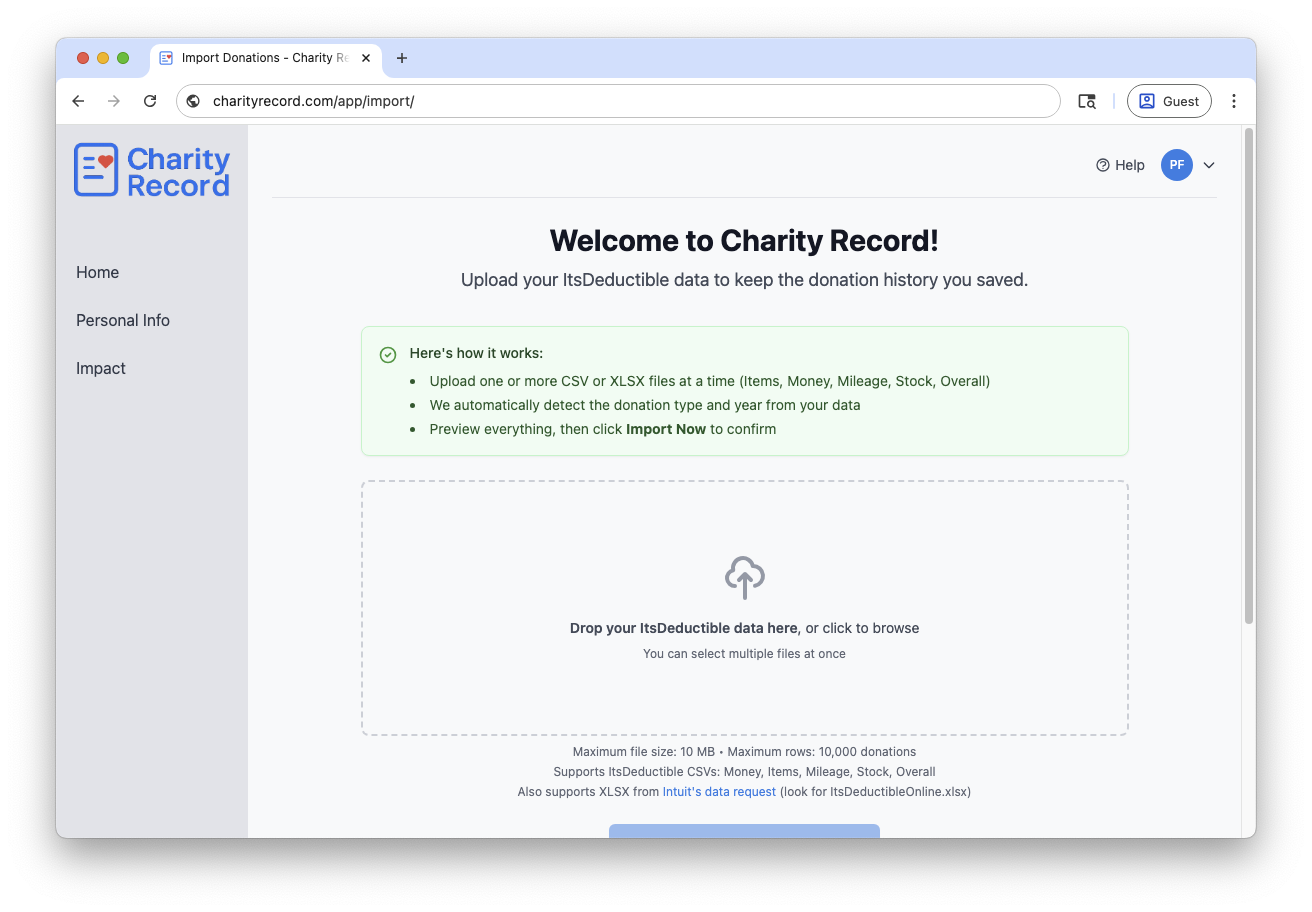 Drop your file, then check the preview before importing
What transfers when you import
For most people, the Intuit data request file gets what you need: it brings over the history you care about and gets you up and running quickly. The exact level of detail depends on which export you have.
- Both import paths bring over your core history. Organization names, available address/location info, donation dates (or "Various" when you tracked recurring donations), donation type, descriptions, and donation values come across so your year-by-year history is usable right away.
- Item donations transfer well from either path. Quantity, condition, per-item fair market value, and descriptions all carry over. The XLSX path maps condition labels (like "good" or "excellent") to Charity Record's quality tiers and preserves any differences as a note.
- Mileage imports with full detail from either path. Miles driven, other transportation costs, cost descriptions, and donation descriptions all come through.
- Stock donations are richer from legacy CSVs. Both paths bring over the symbol, full name, date acquired, and FMV on date donated. Legacy CSVs also include cost basis, number of shares, and acquisition method, which the Intuit XLSX does not contain. If you import stock donations, be sure to check what imported.
- Cash donations are richer from legacy CSVs. Both paths bring over the amount, date, and description. Legacy CSVs may also include payment type, payment details, and the receipt yes/no flag, which the Intuit XLSX does not contain.
After the import: review your history
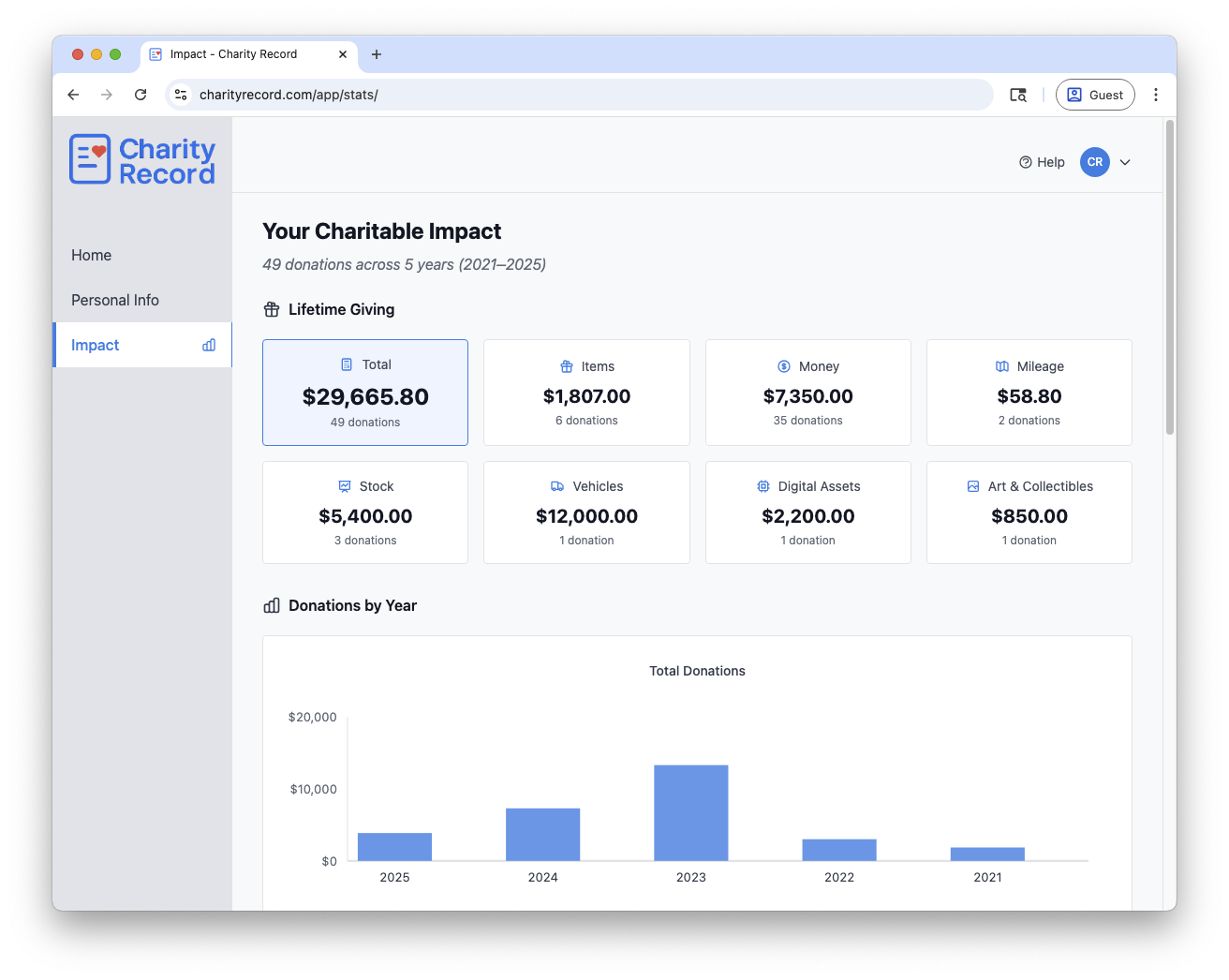 Your imported history shows up in our Impact report, and on your dashboard immediately
Once your data is imported, take a few minutes to review it. If you imported via the Intuit XLSX, stock cost basis and cash payment details are not in Intuit's export, so you may want to fill those in. Recurring donations dated "Various" are also worth a look, plus any cash donations where you added additional details.
- Check your dashboard. Your year-over-year history populates immediately on your dashboard. You can see totals by donation type, by organization, and by year.
- Spot-check a few donations. Pick a donation you remember and verify the details look right. The import preview shows exactly what was detected before you confirm, so you can catch issues early.
- Review your organizations. ItsDeductible sometimes stored organization names in inconsistent formats. You can edit organization details in Charity Record if anything looks off, or if an address is missing.
Tracking new donations going forward
If you used ItsDeductible, you already understand the value of year-round charitable donation tracking. Here is what changes with Charity Record (and in some cases, what improves!):
- Same basic workflow. Pick an organization, choose a donation type, enter details. Our FMV database contains estimated values for common items, similar to how ItsDeductible worked.
- Three more donation types. ItsDeductible tracked items, cash, mileage, and stock – so does Charity Record. We also add tracking for vehicles, digital assets (crypto), and art/collectibles. If you have been tracking those types separately, you can consolidate everything in one place.
- Autosave for item donations. Entering a batch after a closet cleanout? Your list saves as you go, so you are less likely to lose work if something interrupts you. (More on autosave.)
- Export when you're ready. CSV exports are available on the free tier. PDF and HTML reports come with paid plans. You can share these directly with a tax preparer or use them as reference while filing.
- Tax software integration. Paid plans also include TXF export, which can be useful with TurboTax Desktop and some H&R Block Desktop workflows. TXF is an older format with real limits, so review TXF Export: What to Expect before relying on it.
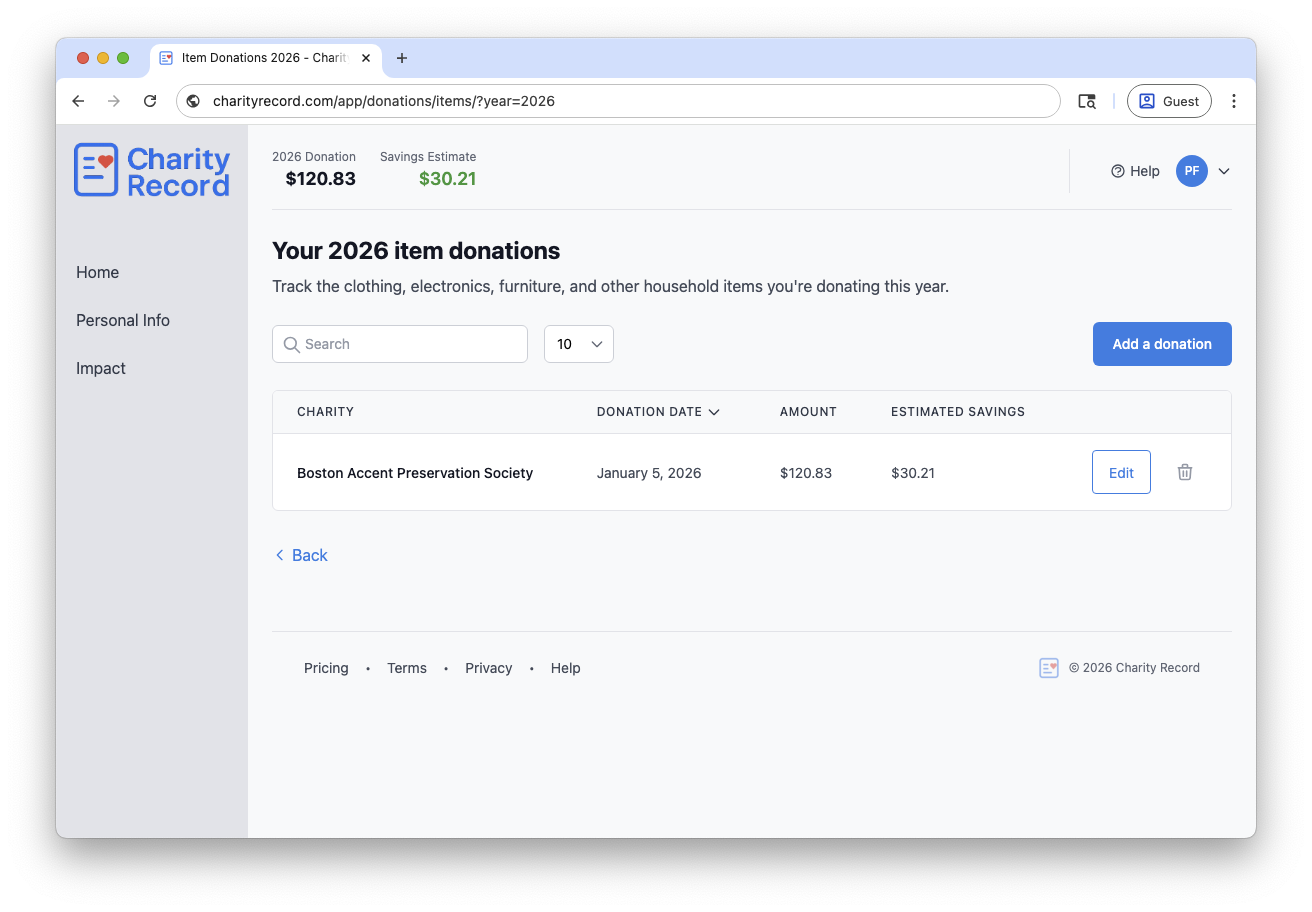 Add items one at a time or in batches; your work saves automatically
Frequently asked questions
Can I import data from multiple years?
Yes. The XLSX export from Intuit typically contains all years in a single file. CSV exports can be imported one file at a time, but you can drag and drop multiple files at once – Charity Record will split donations by year automatically.
If a file contains only donations dated "Various" (common with recurring donations), Charity Record will ask you to choose the tax year during preview.
What if I already started tracking in Charity Record?
Importing adds to your existing data. It does not overwrite donations you have already entered. The importer uses hash-based deduplication to avoid creating duplicate records when you import multiple times.
Is there a limit on how much I can import?
We support files up to 10MB and 10,000 rows. The free plan lets you track up to $500 in total donations (and imports don't count towards that limit). Beyond that, the paid plan ($29.99/year, plus applicable tax) covers unlimited tracking and premium exports. See our billing FAQ for details.
Can I still use my ItsDeductible data with TurboTax?
ItsDeductible's direct TurboTax sync no longer exists, but there are alternatives.
You can import your history into Charity Record and export as TXF for TurboTax Desktop. TXF is an older format and has real limits, so review our TXF Export: What to Expect guide before relying on it. For TurboTax Online, or when TXF does not work well for your situation, use PDF or HTML exports as reference while entering donations manually in your tax software.
Get started
Create a free Charity Record account and import your ItsDeductible history. We're free up to $500 in donations tracked, then $29.99/year plus applicable tax for unlimited tracking and premium exports. No credit card required to start.
For the full feature comparison between ItsDeductible and Charity Record, see how we stack up as an ItsDeductible alternative.
After you import, keep the original Intuit ZIP or XLSX file as a backup.
Charity Record is a donation tracking tool, not a tax advisor. This article is intended to help you use our software and is not tax advice. For questions about deduction eligibility or documentation requirements, consult a tax professional.
ItsDeductible is a trademark of Intuit Inc. Charity Record is not affiliated with, endorsed by, or sponsored by Intuit.
More resources:
About Charity Record
The Charity Record Team
Ready to track your donations?
Create a free account and start organizing your charitable giving for tax time.
Create Free AccountFree up to $500 in donations. No credit card required.