Recording Art or Collectibles Donations
Summary: Record art, antiques, jewelry, coins, and other collectibles with the description, fair market value (FMV), and appraisal details the IRS expects for noncash donations. For art or collectibles over $5,000, IRS guidance generally requires a qualified appraisal and Form 8283 Section B. Art valued at $20,000 or more generally requires attaching the signed appraisal to your return and keeping a photo ready. See IRS Publication 561 and the Form 8283 instructions.
What counts as art or collectibles
The IRS treats paintings, sculptures, antiques, jewelry, coins, stamps, and similar property as art or collectibles for reporting purposes. If your donation is not a typical household item and has collector or market value, it usually fits here. See the Form 8283 instructions for the IRS definitions.
What you will need
Before you start, gather:
- Charity name
- Donation date
- Item type and description
- FMV on the donation date
- How you determined the value
- Physical condition (required for items over $5,000)
- Date acquired, or select Various dates when all items were held more than one year
- Appraisal details, if required
- Photo availability for higher value art
Add an art or collectibles donation
- Select the charity in the Charity name dropdown.
- Enter the Date of donation.
- Choose an Item type and enter a detailed Description.
- Enter the Fair market value on donation date.
- Choose How did you determine the value?.
- Enter Physical condition if the item is over $5,000.
- Choose a Date item was acquired or select Various dates.
- In Appraisal information, note whether you have a qualified appraisal, plus appraiser name and appraisal date if available.
- If prompted, confirm whether you have a photo ready if requested for higher value art.
- Click Add donation.
If the charity is new, select + Create new charity or click Add to open the full charity form.
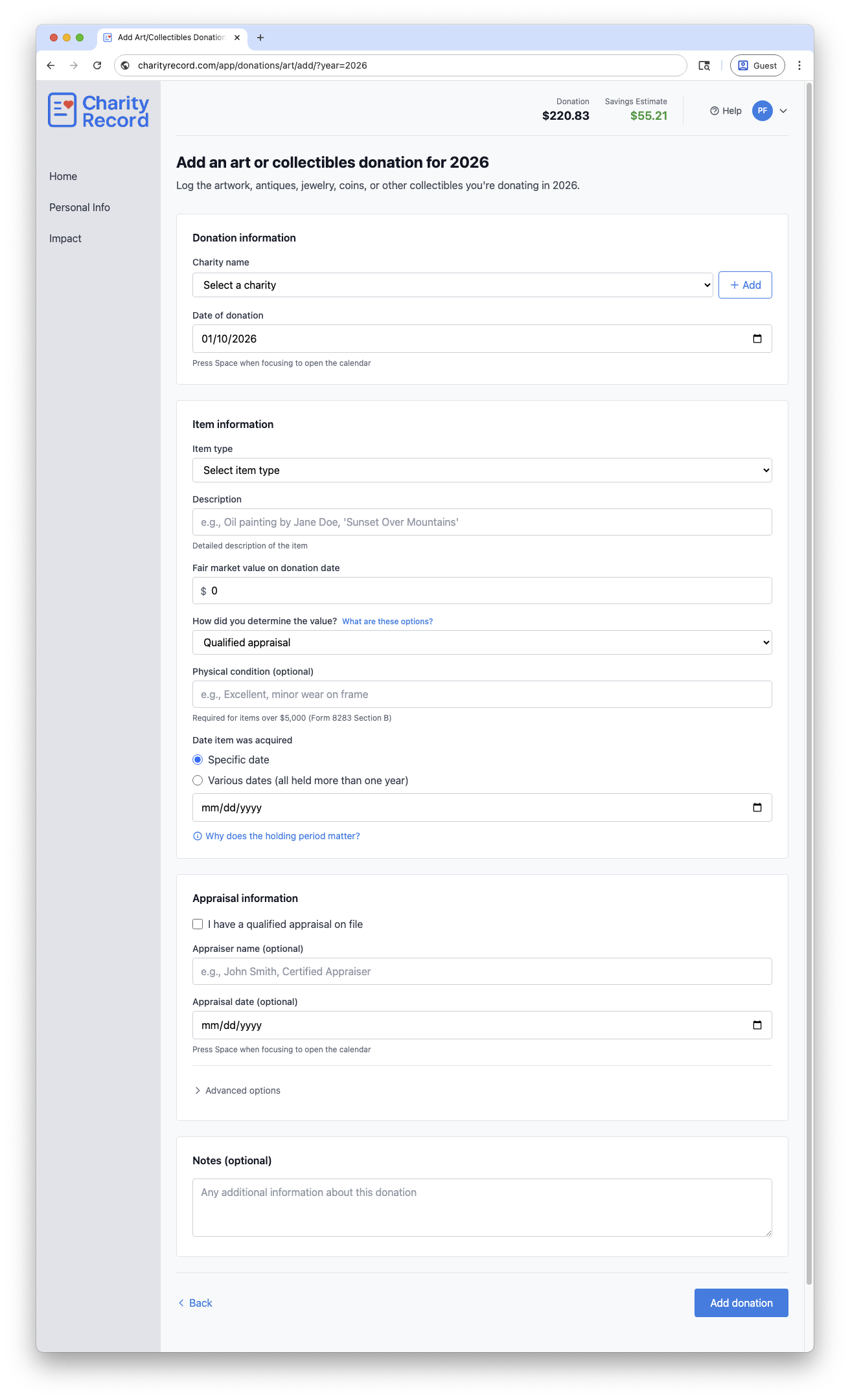 The Art & Collectibles donation form
Appraisals and photo requirements
IRS guidance treats art and collectibles as property. Based on the Form 8283 instructions and IRS Publication 561:
- If your total claim for a similar group of art or collectibles exceeds $5,000, you need a qualified appraisal and Form 8283 Section B. The appraisal must be completed no earlier than 60 days before the donation and obtained before you file your return.
- If your deduction for art is $20,000 or more, you must attach the signed appraisal to your return. Keep a photo ready and provide it upon request (preferably an 8 x 10 color photo or high resolution image).
- For art valued at $50,000 or more, the IRS allows a Statement of Value request before filing.
A qualified appraiser must have verifiable education and experience valuing the type of property being appraised and cannot be the donor, donee, or a related party. See IRS Publication 561 for the full requirements.
How the IRS reviews art appraisals
The IRS does not accept appraisals without question. Art Appraisal Services may review appraisals and refer cases to the Commissioner's Art Advisory Panel – generally for items valued above $150,000, though AAS has discretion to refer other cases.
For art appraised at $50,000 or more, you can request a Statement of Value from the IRS before filing. This optional process lets you request a Statement of Value you can use to complete your return. As of this post date, the IRS lists a fee of $8,400 for one to three items, plus $800 for each additional item. Fees can change, so check the IRS page for current rates. See IRS Art Appraisal Services for details.
Fair market value (FMV) and documentation
Publication 561 lists acceptable ways to document FMV for art and collectibles, such as:
- Qualified appraisal
- Auction records or comparable sales
- Dealer or gallery statements
- Price guides or catalogs
Choose the method that best matches how you arrived at the value and keep supporting records. Charity Record does not validate appraisals or fetch prices for art or collectibles.
Holding period and "Various dates"
Use Various dates only when all items in the donation were held more than one year. If any items were held one year or less, record those separately with the specific acquisition date.
The Why does the holding period matter? link on the form summarizes the IRS guidance. The IRS requires the date acquired on Form 8283. See the Form 8283 instructions.
If you created the artwork
If you created the artwork yourself, the IRS generally treats it as ordinary income property. In most cases, that limits your deduction to your cost basis, such as materials and other out-of-pocket costs. You generally cannot deduct your time, labor, or the appreciation in value. See IRS Publication 526.
Records to keep
Keep records that support your entry, such as:
- Charity acknowledgment
- Appraisal report (if required)
- Photos of the item
- Comparable sales or auction results
- Appraiser contact details
You can store supporting details in the Notes field.
CSV import and export
You can import art and collectibles donations from a CSV file and export them back to CSV.
To import, click Add Donation on your dashboard, then Import CSV/XLSX. Format your file with the art columns described in the Import format guide. Not every column needs a value. Fill in what you have and leave others blank.
To export all art donations for a year, click Download data on your dashboard and choose CSV. Art donations appear in their own CSV file with all fields included.
To export a single art donation, click the Download button on its row in the donation list and choose Export CSV.
You can re-import exported CSVs into Charity Record.
See Exporting and printing donations for more details.
TXF exports and art donations
TXF export does not carry all art and appraisal details. If you export via TXF, you will need to update the entry in your tax software using the TXF Import Guide you receive when you export. See TXF export: what to expect.
Common questions
Do I need separate entries for multiple pieces?
If items have different acquisition dates or holding periods, record separate donations. The IRS also groups similar items for appraisal thresholds. See IRS Publication 561.
Is the photo required for art over $20,000?
IRS instructions require attaching the signed appraisal to your return for art valued at $20,000 or more. Keep a clear 8 x 10 color photo or high resolution image ready and provide it upon request. See IRS Publication 561.
Where do I record the appraiser details?
Use the Appraiser name and Appraisal date fields in the Appraisal information section.
Where do I enter artist or creator details and cost basis?
Open Advanced options and use the Artist/Creator and Your cost or other basis fields.
Edit or delete an art donation
- Open the art donations list for the year and click Edit.
- To remove it, click Delete and confirm in the modal.
Charity Record is a donation tracking tool, not a tax advisor. This article summarizes publicly available IRS guidance to help you use our software. You are responsible for ensuring your tax filings comply with IRS requirements. For complex situations such as self-created artwork, collections of similar items, unrelated use rules, or appraisal requirements, consult a tax professional for advice specific to your situation.