Recording Digital Asset Donations
Summary: Record cryptocurrency, NFTs, and other digital asset donations with the dates, quantity, cost basis, and fair market value (FMV) the IRS expects for noncash property. For gifts over $5,000, IRS guidance generally requires a qualified appraisal and Form 8283 Section B, even if you use exchange pricing. See IRS Publication 561 and the IRS Virtual Currency FAQs for background.
What counts as a digital asset
The IRS treats virtual currency and other digital assets as property. This includes:
- Cryptocurrency (Bitcoin, Ethereum, stablecoins, etc.)
- NFTs (non-fungible tokens)
- Other blockchain-based tokens
The same noncash donation rules that apply to stock and other property apply here. See the IRS Virtual Currency FAQs for background.
What you will need
Before you start, gather:
- Charity name
- Donation date
- Asset name and symbol, if available
- Quantity donated
- Total cost basis (what you paid or your other basis)
- FMV on the donation date
- Date acquired, or select Various dates when all units were held more than one year
- Valuation source (exchange or pricing site)
If the amount you plan to claim exceeds $5,000, you will generally need a qualified appraisal and Form 8283 Section B.
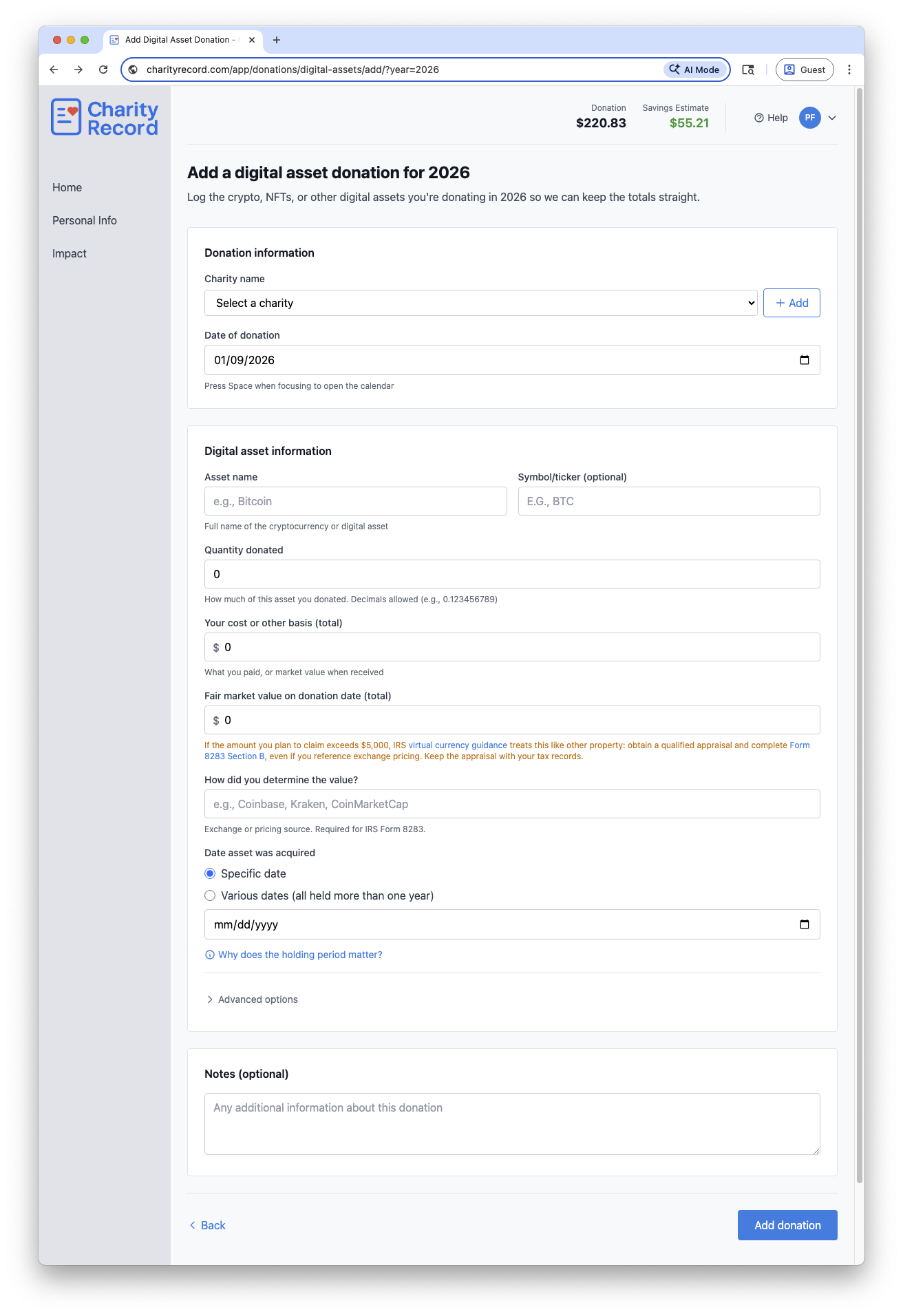 The Charity Record Digital Asset donation form
Add a digital asset donation
- Select the charity in the Charity name dropdown.
- Enter the Date of donation.
- Enter the Asset name and optional Symbol/ticker.
- Enter Quantity donated.
- Enter Your cost or other basis (total).
- Enter the Fair market value on donation date (total).
- Enter the exchange or pricing source in How did you determine the value?.
- Choose a Date asset was acquired or select Various dates.
- If needed, open Advanced options to set how you acquired the asset and check I have a qualified appraisal on file.
- Click Add donation.
If the charity is new, select + Create new charity or click Add to open the full charity form.
Fair market value (FMV)
For digital assets, FMV is generally based on a reasonable exchange price on the donation date. Choose a reputable exchange or pricing source and keep records of the rate you used. See IRS Publication 561 for valuation guidance. Your deduction is subject to AGI limits; see IRS Publication 526 for details.
Enter the totals you plan to claim. Note: Charity Record does not connect to wallets or exchanges and does not fetch prices for you, you are responsible for the amount you enter.
If there is no active market (for example, some NFTs), use the most reasonable method available and document how you determined the value. NFTs with thin markets may require extra documentation or a qualified appraisal.
Holding period and "Various dates"
Use Various dates only when all units in the donation were held more than one year. If any units were held one year or less, record those units in a separate donation with the specific acquisition date.
Holding period can affect how much you can deduct; see the Form 8283 instructions for details. The Why does the holding period matter? link on the form summarizes the IRS guidance.
How you acquired the asset
The IRS asks how you acquired donated property on Form 8283. In Advanced options, choose the method that fits your situation:
- Purchased - Your basis is generally what you paid, including transaction fees.
- Gift - Your basis is generally the donor's basis, with special rules if FMV was lower on the gift date.
- Inheritance - Your basis is generally the FMV on the date of death.
- Mining rewards or Staking rewards - Your basis is generally the FMV when you received the asset, and that amount is typically income.
- Airdrop or Hard fork - Your basis is generally the FMV when you gained dominion and control, and that amount is typically income.
If you are unsure how to determine basis, see IRS Publication 551 or consult a tax professional.
Appraisals and Form 8283
Digital assets are treated as property. Based on Form 8283 instructions:
- If your total claim for the donation is over $500, you will typically file Form 8283.
- If the amount you plan to claim exceeds $5,000, IRS guidance generally requires a qualified appraisal and Form 8283 Section B, even if you used exchange pricing.
Use the I have a qualified appraisal on file checkbox to track whether you have the appraisal, and keep it with your records.
Records to keep
Keep records that support your entry, such as:
- Donation acknowledgment from the charity
- Exchange or pricing screenshots for FMV
- Wallet transaction hashes or transfer confirmations
- Appraisal documentation, if required
Use the Transaction details field in Advanced options for wallet addresses or transaction hashes. Use the Notes field for any other information about the donation.
CSV import and export
You can import digital asset donations from a CSV file and export them back to CSV.
To import, click Add Donation on your dashboard, then Import CSV/XLSX. Format your file with the digital asset columns described in the Import format guide. Not every column needs a value. Fill in what you have and leave others blank.
To export all digital asset donations for a year, click Download data on your dashboard and choose CSV. Digital asset donations appear in their own CSV file with all fields included.
To export a single digital asset donation, click the Download button on its row in the donation list and choose Export CSV.
You can re-import exported CSVs into Charity Record.
See Exporting and printing donations for more details.
TXF exports and digital assets
TXF export does not carry all digital asset details. If you export via TXF, you will need to update the entry in your tax software using the TXF Import Guide you receive when you export. See TXF export: what to expect.
Common questions
Do I need to split multiple lots? Yes. If your units have different acquisition dates or holding periods, record separate donations. Use Various dates only when all units were held more than one year.
What if I donated from multiple wallets or exchanges? Record the donation as long as it represents a single transfer. Use Transaction details or Notes to capture wallet addresses or transaction hashes.
What if I don't know my cost basis? You are responsible for tracking your cost basis. Check your exchange transaction history, wallet records, or tax software. If you cannot determine the basis, consult a tax professional.
Where is the TXF Import Guide? When a TXF export includes digital assets, the TXF Import Guide appears on the TXF preview page.
Edit or delete a digital asset donation
- Open the digital asset donations list for the year and click Edit.
- To remove it, click Delete and confirm in the modal.
Charity Record is a donation tracking tool, not a tax advisor. This article summarizes publicly available IRS guidance to help you use our software. You are responsible for ensuring your tax filings comply with IRS requirements. For complex situations such as NFTs with thin markets, gifted assets with special basis rules, mining or staking income implications, or appraisal requirements, consult a tax professional for advice specific to your situation.