Recording Stock or Securities Donations
Summary: Record stock, mutual fund, or bond donations with the dates, shares, cost basis, and fair market value (FMV) needed for IRS reporting. If you donate private stock, you will typically need a qualified appraisal for higher value gifts. See IRS Publication 526 and IRS Publication 561 for guidance.
What you will need
Before you start, gather:
- Charity name
- Donation date
- Ticker symbol or company name
- Number of shares
- Total cost basis (what you paid or your adjusted basis)
- FMV on the donation date
- Date acquired, or select Various dates when all shares were held more than one year
For private stock over $5,000, you will generally need a qualified appraisal and Form 8283 Section B.
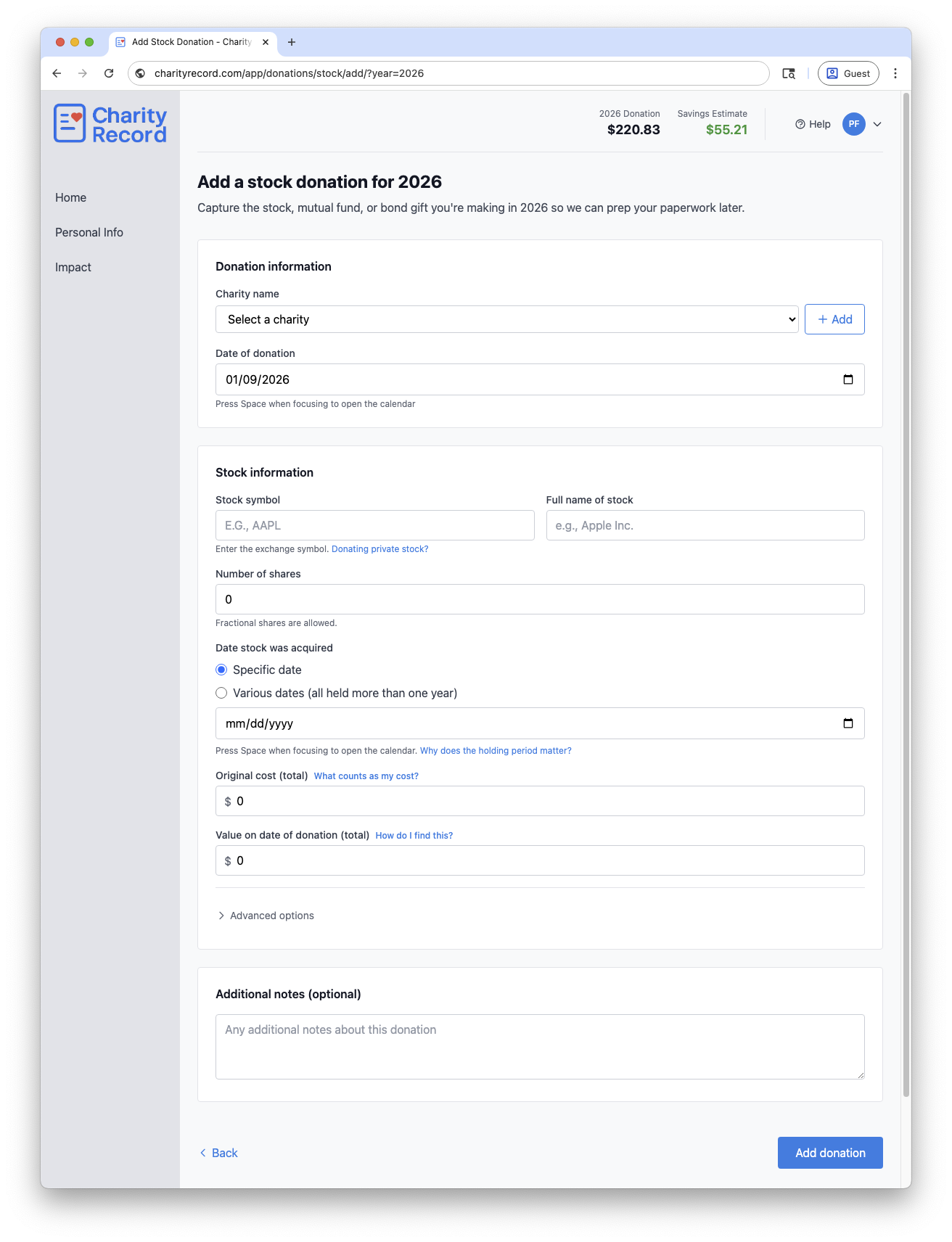 The stock donation form with options
Add a stock donation
- Select the charity in the Charity name dropdown.
- Enter the Date of donation.
- Enter the Stock symbol and Full name of stock.
- Enter Number of shares.
- Choose a Date stock was acquired or select Various dates.
- Enter Original cost (total) and Value on date of donation (total).
- If needed, open Advanced options to set how you acquired the stock and the FMV method.
- Click Add donation.
If the charity is new, select + Create new charity or click Add to open the full charity form.
Publicly traded vs private stock
Publicly traded stock
- Leave This is publicly traded stock checked.
- Use the exchange symbol, e.g., 'AAPL'.
- Publication 561 describes the FMV method as the average of the high and low trading prices on the donation date. If there were no sales on that date, use the nearest dates before and after. If no sales occurred within a reasonable period, use the average of the bona fide bid and ask prices. (See more about FMV here.)
- Publicly traded securities are generally exempt from the qualified appraisal requirement and are typically reported in Form 8283 Section A, even above $5,000.
Private or closely held stock
- Click Donating private stock? or uncheck This is publicly traded stock.
- Use a short company identifier if there is no ticker.
- Select Qualified appraisal in How did you determine the fair market value?.
- If the FMV exceeds $5,000, you will generally need a qualified appraisal and Form 8283 Section B.
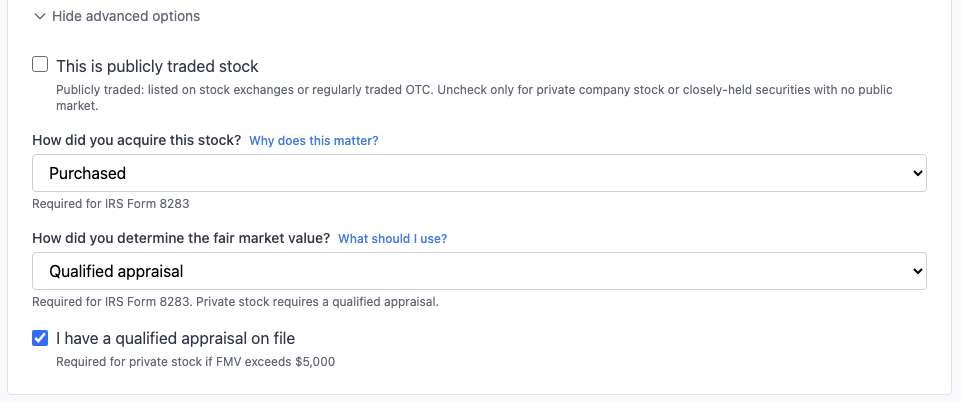 You can toggle between publicly traded and private securities in Advanced Options
If you are unsure on how to enter your donation, consult a tax professional before filing. See more about FMV methods and qualified appraisals in our Stock cost basis article.
Holding period and “Various dates”
Use Various dates only when all shares in the donation were held more than one year. If any shares were held one year or less, enter the specific acquisition date and separate those shares.
The Why does the holding period matter? link on the form summarizes how holding period affects deductions.
Cost basis and FMV
Cost basis can change based on how you acquired the stock. If you used RSUs, stock options, gifted shares, or inheritance, the What counts as my cost? link on the form explains common cases and IRS references.
For publicly traded stock, FMV is typically based on market prices on the donation date. The How do I find this? link on the form summarizes acceptable methods.
Charity Record does not fetch market prices or calculate cost basis for you. Enter the totals you plan to claim. For more help, see our Stock cost basis article.
Records to keep
Keep records that support your entry, such as:
- Brokerage statements or trade confirmations
- A donation acknowledgment or confirmation from the charity
- Appraisal documentation if required
- Details needed for Form 8283
CSV import and export
You can import stock donations from a CSV file and export them back to CSV.
To import, click Add Donation on your dashboard, then Import CSV/XLSX. The basic format uses nine columns matching the ItsDeductible stock export. The extended format adds share count, publicly traded flag, acquisition method, FMV method, appraisal status, and notes. See the Import format guide for column details and allowed values.
To export, click Download data on your dashboard and choose CSV, then Stock & Securities.
To instead export a single donation, click the Download button on its row in the donation list and choose Export CSV.
You can re-import exported CSVs into Charity Record. The exported file includes all columns and can be re-imported into Charity Record. See Exporting and printing donations for more.
TXF exports and stock donations
If you are importing your records in tax software, you probably plan to export to TXF.
Unfortunately, TXF import does not carry along all stock details. If you export via TXF, you will need to update the stock entry in your tax software using the TXF Import Guide you'll receive when you export to TXF. See TXF export: what to expect.
Common questions
Do I need to split multiple lots?
If your shares have different acquisition dates or holding periods, record separate stock donations. Use Various dates only when all shares were held more than one year.
What if there is no ticker symbol?
Use a short identifier (for example, a fund ticker, bond symbol, or internal abbreviation) and enter the full name in the description field.
Where is the TXF Import Guide?
When a TXF export includes stock, the TXF Import Guide is available on the TXF preview page. It guides you on what to change in your tax software.
Edit or delete a stock donation
- Open the stock donations list for the year and click Edit.
- To remove it, click Delete and confirm in the modal.
Charity Record is a donation tracking tool, not a tax advisor. This article summarizes publicly available IRS guidance to help you use our software. You are responsible for ensuring your tax filings comply with IRS requirements. For complex situations such as private stock, gifted shares with adjusted basis, or appraisal requirements, consult a tax professional for advice specific to your situation.