Recording Vehicle Donations
Summary: Record car, truck, motorcycle, boat, RV, or airplane donations with the VIN, odometer or hours, and Form 1098-C details the IRS expects for vehicle contributions. For most vehicle donations over $500, you must have Form 1098-C and your deduction is generally limited to the sale price unless the charity keeps or improves the vehicle. See IRS Publication 526, IRS Publication 561, and the Form 8283 instructions.
What the IRS considers a qualified vehicle
The IRS treats cars, trucks, vans, motorcycles, boats, airplanes, and motor homes or RVs as qualified vehicles. The Form 8283 instructions cover the definition and reporting rules. See the Form 8283 instructions.
What you will need
Before you start, gather:
- Charity name
- Donation date
- Year, make, and model
- VIN (required for most deductions over $500)
- Odometer or hours
- Value from Form 1098-C
- Whether you received Form 1098-C
- Date acquired (or Various dates if you donated multiple vehicles in one entry and all were held more than one year, or the exact date is unknown but held more than one year)
- Cost basis and how you acquired the vehicle (if available)
Add a vehicle donation
- Select the charity in the Charity name dropdown.
- Enter the Date of donation.
- Enter the Year, Make, and Model.
- Enter the VIN (Vehicle Identification Number).
- Enter the Odometer/hours.
- Enter the Value from Form 1098-C.
- Check I received Form 1098-C from the charity if you have it.
- Choose a Date you acquired this vehicle or select Various dates (rare, for multiple vehicles held more than one year or when the exact date is unknown but held more than one year).
- If needed, open Advanced options to set how you acquired the vehicle, the cost basis, and the FMV method.
- Click Add donation.
If the charity is new, select + Create new charity or click Add to open the full charity form.
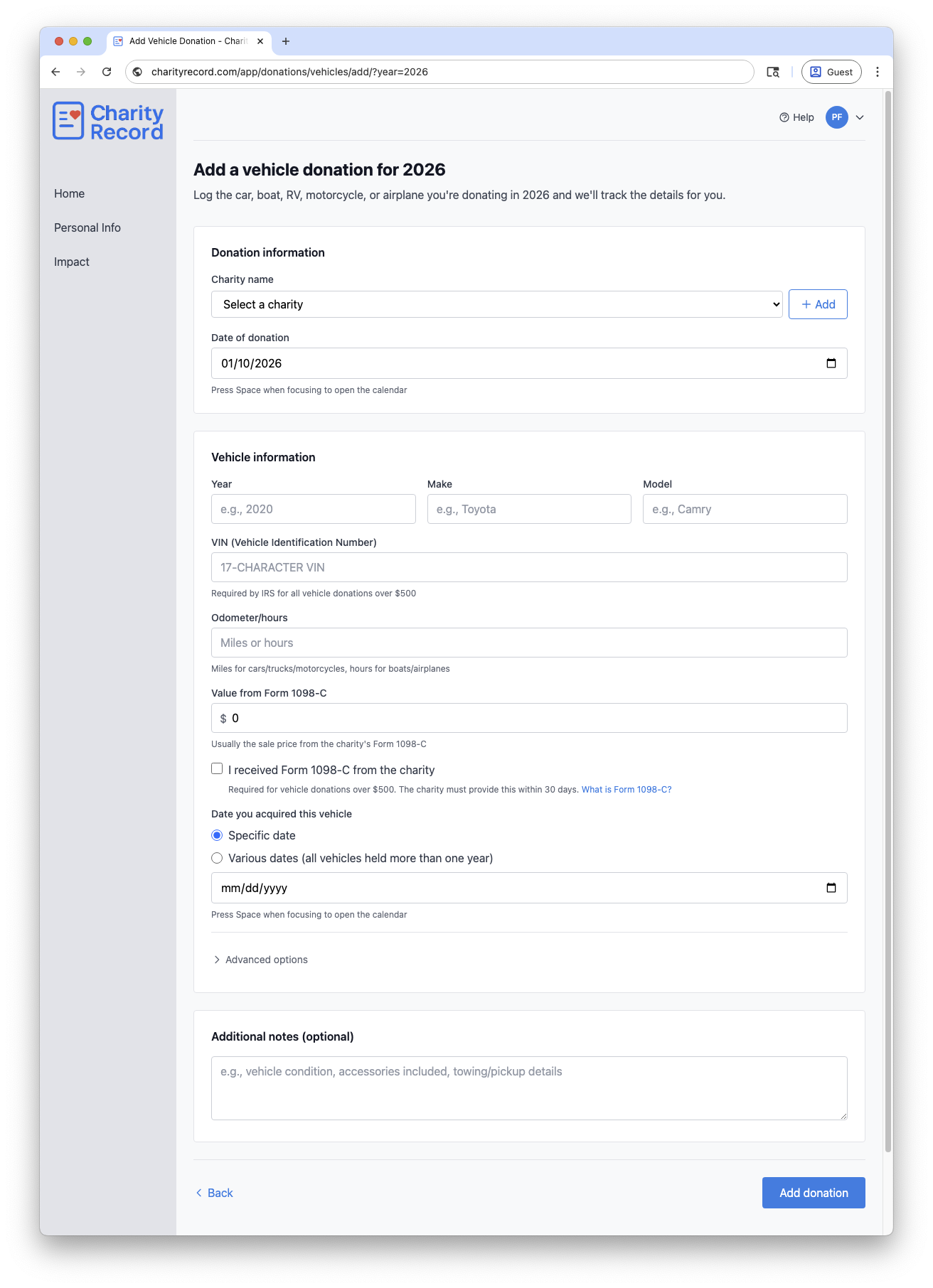 Add a vehicle donation record
Form 1098-C and your deduction
IRS rules for vehicle donations are different from most other property. In general:
- If your claimed deduction is over $500, you must have Form 1098-C (or a similar acknowledgment) from the charity and attach it to your return.
- If the charity sells the vehicle, your deduction is generally limited to the gross proceeds shown on Form 1098-C.
- If the charity keeps and uses the vehicle or makes a material improvement, the deduction can be based on fair market value instead.
- The charity must usually provide Form 1098-C within 30 days.
See IRS Publication 526 and the Form 8283 instructions for the exceptions and documentation rules.
Fair market value (FMV) methods
Most vehicle donations use the Form 1098-C sale price. If the charity keeps the vehicle, IRS guidance allows you to use a reputable used vehicle price guide or comparable sales, adjusted for mileage and condition. See IRS Publication 561.
In Advanced options, choose the FMV method that matches your documentation:
- Form 1098-C (sale price from charity)
- Kelley Blue Book / NADA
- Comparable sales
- Qualified appraisal
Appraisals and Form 8283
If your claimed value exceeds $5,000, a qualified appraisal and Form 8283 Section B are generally required. However, IRS rules do not require an appraisal if your deduction is limited to gross proceeds and you have the required acknowledgment. See IRS Publication 561.
Holding period
The IRS requires the date acquired on Form 8283. If you do not know the exact date but held the vehicle more than one year, select Various dates. If you held it one year or less, you will need the specific acquisition date. See the Form 8283 instructions.
If you are donating multiple vehicles in one entry, use Various dates only when all were held more than one year. If any vehicle was held one year or less, record it separately with the specific acquisition date.
Records to keep
Keep records that support your entry, such as:
- Form 1098-C or written acknowledgment
- Donation acknowledgment from the charity
- Any appraisal documentation, if required
- Price guide or comparable sales evidence, if used
- Notes about condition, mileage, and improvements
You can store supporting details in the Additional notes (optional) field.
CSV import and export
You can import vehicle donations from a CSV file and export them back to CSV.
To import, click Add Donation on your dashboard, then Import CSV/XLSX. Format your file with the vehicle columns described in the Import format guide. The practical minimum is Charity, Donation Date, Make, Model, and FMV. Fill in additional columns (VIN, odometer, year, etc.) as you have them.
To export, click Download data on your dashboard and choose CSV. Vehicle donations appear in their own CSV file with all fields included.
To export a single vehicle donation, click the Download button on its row in the donation list and choose Export CSV.
You can re-import exported CSVs into Charity Record.
See Exporting and printing donations for more.
TXF exports and vehicle donations
TXF export does not carry all vehicle details. If you export via TXF, you will need to update the entry in your tax software using the TXF Import Guide you receive when you export. See TXF export: what to expect.
Common questions
Which value should I enter from Form 1098-C?
Use the sale price or gross proceeds shown on Form 1098-C if the charity sold the vehicle. See IRS Publication 526.
What if I have not received Form 1098-C yet?
The IRS generally requires Form 1098-C for deductions over $500. If you do not have it yet, contact the charity or consult a tax professional about timing and filing options. See IRS Publication 526.
What if the charity says it will use the vehicle?
Form 1098-C indicates whether the charity will use or materially improve the vehicle. Follow the instructions on the form and IRS guidance for the proper deduction amount. See IRS Publication 526.
Do I need separate entries for multiple vehicles?
Generally yes - record each vehicle separately. In rare cases where you donate multiple similar vehicles in one transaction and all were held more than one year, you can use Various dates for the acquisition date.
Edit or delete a vehicle donation
- Open the vehicle donations list for the year and click Edit.
- To remove it, click Delete and confirm in the modal.
Charity Record is a donation tracking tool, not a tax advisor. This article summarizes publicly available IRS guidance to help you use our software. You are responsible for ensuring your tax filings comply with IRS requirements. For complex situations such as vehicle use exceptions, appraisal requirements, or questions about Form 1098-C, consult a tax professional for advice specific to your situation.